Works on my Claude Code (and now yours)
TL;DR
- Claude Code has a lot of confusing options if you want to use cloud agents.
--remote,--teleport, others?! - You probably want just plain "Claude Code on the web" using their sandbox.
- The "Claude Code on the web" sandbox needs configuring.
- The same sandbox backs Claude on the web, the mobile app, and
/ultraplan//ultrareviewruns from the CLI. Configure once, covered everywhere on any sandbox. - Coding agents should check their own work using your real toolchain (type checker, linter, compiler), at the specific versions your team runs. Without that you may not be able to reproduce bugs or cause easily avoidable PR check failures, or even subject your code to supply chain attacks.
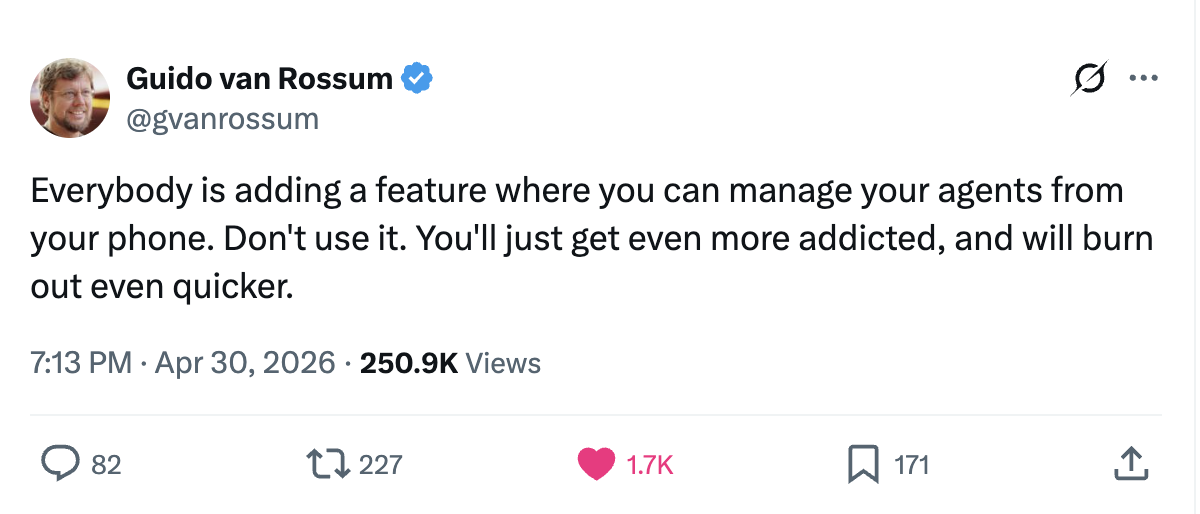
Probably wise words. Alas we proceed:
Ok, forget about claude --remote or claude --teleport or w/e shenanigans. I am calling it now, just invest the time for you and your team to set up your repo for a generic sandbox environment. Thank me later.
Anthropic generously right now provides a Ubuntu 24.04 box running as root with ~4 vCPUs, 16 GB RAM, and 30 GB disk and the price is ~right~ (free for now).
If you follow these steps you should get yourself a hermetic, reproducible sandbox environment that you can take anywhere, and I claim, on any harness.
Ok, hopefully I have you convinced, if yes and if you'd rather just hand this to a coding agent, jump to Hand this to your agent.
There is a problem though: the sandbox created by Claude Code will very likely not have the exact environment for your project.
Why bother?
If you need convincing: if you instructed your agent to actually use your project's type checker, linter, and compiler to verify its own work (run tests?), then these should mirror your local versions exactly. Pin the exact Python runtime you currently use. i.e. 3.12.12, not "3.12"; pin your linter and type checker to whatever your team runs. If the agent's runtime drifts from yours, bugs that depend on patch behavior won't reproduce. On the other hand, package managers like uv are the exception (unless you're building a docker image): those you want at the latest stable release.
I set this up for my python-based project, and there are a handful of non-obvious things that will make you scratch your head. This is the guide I wish existed:
The strategy
You'll need 3 things: an environment startup script, a SessionStart CC hook and a small script you paste into the environment:
- Checked in cloud setup script (the textbox; references a script in your repo). Cached for ~7 days. Use it for what your current dev env already has — system libs, exact language runtimes, package managers, LSP server binaries, etc.
SessionStarthook (committed to.claude/settings.json). Runs every session startup/resume on cloud and local. Use it for project deps that move with the codebase —uv sync,npm install, etc.
For python, Warning: If you bake uv sync into the cached setup script and your cloud sessions keep resuming against the snapshot for a week while teammates bump uv.lock on main. Also: the hook running locally means the agent never starts on stale deps when you switch git branches.
Run /web-setup (if your admin enabled it)
If you haven't already, run /web-setup to share your local GH cli token w/ Claude :yikes_emoji or better yet install the Anthropic app in your GitHub repo or org.
SessionStart hook vs setup script
Anthropic's table covers the details. But the tl;dr is
- If my dev environment already has it, use the setup script to install the exact version.
- If it changes when teammates bump lockfiles, or other shenanigans, tell Claude to write you a
SessionStarthook.
So the setup script gets apt, uv itself, mise, pinned runtimes (uv python install / mise install), and any LSP server binaries you build from source. Hook gets uv sync, mix deps.get, npm install. The hook also runs locally, so make it fast on no-op — these three commands all are by default, but if you bolt on mix compile or a slow build step, gate it behind a stamp file or your laptop will pay the cost on every claude startup.
The setup script
The "Update cloud environment" dialog with Name, Network access, Environment variables, and Setup script fields You might feel the urge to paste your script straight into this textbox. Don't!
The docs hint that environment configs and scripts can be visible to anyone who can edit that environment. This might be an unreleased feature since I haven't been able to share them on either my Team or personal Max account, and the env isn't even linked to a specific GitHub repo, so each engineer ends up re-deriving the same setup from scratch.
The trick: the repo gets cloned first, then the setup script runs from the repo root, and only then does Claude Code launch. So you can keep your script in the repo, reference it from the textbox, and let it double as a local onboarding script for new engineers.
Put this in scripts/onboard.sh (toolchain only — no uv sync etc., that goes in the hook):
#!/usr/bin/env bash
set -euo pipefail

REPO_ROOT="$(cd "$(dirname "${BASH_SOURCE[0]}")/.." && pwd)"
cd "$REPO_ROOT"

# Drop pre-installed Launchpad PPAs that 403 in the sandbox.
rm -f /etc/apt/sources.list.d/deadsnakes*.list \
      /etc/apt/sources.list.d/ondrej*.list 2>/dev/null || true

# Install or upgrade uv. The pre-installed version tends to lag.
if ! command -v uv >/dev/null 2>&1; then
  curl -LsSf https://astral.sh/uv/install.sh | sh
  export PATH="$HOME/.local/bin:$PATH"
else
  uv self update --quiet || true
fi

uv python install   # reads .python-version, pins exactly
Then, in the setup script textbox, paste:
bash "$(find /home /root -maxdepth 4 -name "onboard.sh" 2>/dev/null | head -1)"
The form above isn't project-specific: anyone on your team can use the same one-liner, every repo just needs an onboard.sh. Multi-repo sessions work too; find returns the first match (only that one runs).
(Hint to the Claude Code team: these env configs really ought to be shareable at the org level. No good reason every engineer has to hand-paste the same setup textbox.)
Project deps go in a SessionStart hook. Drop this into .claude/settings.json:
{
  "hooks": {
    "SessionStart": [{
      "matcher": "startup|resume",
      "hooks": [{
        "type": "command",
        "command": "uv sync --all-groups"
      }]
    }]
  }
}
For multi-runtime projects, point the hook at a scripts/dev-setup.sh instead and put your uv sync && mix deps.get && npm install in there — easier to read, easier to test locally.
A few smaller things
- The default Trusted network preset covers what you need (npm, PyPI, Docker Hub, GitHub releases, Ubuntu archives). Leave it.
- Tools shipping their own CA bundles trip on the TLS proxy. We hit this with Erlang/Hex; the fix is
SSL_CERT_FILE=/etc/ssl/certs/ca-certificates.crtandHEX_CACERTS_PATH=/etc/ssl/certs/ca-certificates.crtin the env vars box. rm -fthe deadsnakes and ondrej PPAs from/etc/apt/sources.list.d/in youronboard.shbeforeapt-get update. Those specific PPAs 403 in the sandbox even though Launchpad itself is in the Trusted allowlist;uv python installcovers what deadsnakes would have given you anyway.- The env vars box is plaintext. No secrets. Fine for things like
LANG=en_US.UTF-8(sandboxes sometimes start withlatin1, which breaks tools expecting UTF-8). ghis not pre-installed (the docs say so, though I'd swear I've seen it on the image at some point). Addapt install -y ghto youronboard.shif you need it, and setGH_TOKENin the env vars box for authenticated calls. For public release assets, plaincurlskips the install entirely.
LSPs
Claude Code can use language servers in remote sessions, but only if every eng has them installed or they're declared in .claude/settings.json checked into your repo.
For pyright (CC's official Python LSP):
{
  "enabledPlugins": {
    "python-lsp@claude-plugins-official": true
  }
}
For ty (Astral's type checker, faster than pyright on large codebases): ty ships through the Astral marketplace, which isn't registered by default:
{
  "extraKnownMarketplaces": {
    "astral-sh": {
      "source": {
        "source": "github",
        "repo": "astral-sh/claude-code-plugins"
      },
      "autoUpdate": true
    }
  },
  "enabledPlugins": {
    "astral@astral-sh": true
  }
}
For both LSPs you still need the pyright-langserver or ty dependencies installed first on the local machine/sandbox, hence to ensure you have the script correct.
Honesty note: I've confirmed this pattern works in remote sessions for Python, TypeScript and Elixir LSPs but haven't verified others. Spot-check before relying on it.
Hand this to your agent
<task>
Configure this repository to work cleanly with Claude Code on the web by creating a toolchain onboarding script, a project-hydration SessionStart hook, and an LSP configuration. Output the exact one-liner the user should paste into the Claude Code on the web "Setup script" textbox.
</task>

<context>
Claude Code on the web runs in an Ubuntu 24.04 sandbox. Setup scripts run as root, and the repo lands at $HOME/{repo-name}. Outbound traffic goes through a TLS-inspecting proxy. The setup script runs from the repo root, before Claude Code launches, and its filesystem result is snapshotted and reused for ~7 days — so it's the right home for heavy toolchain installs. SessionStart hooks (declared in .claude/settings.json) fire on every session startup/resume in cloud AND local, so they're the right home for project hydration that needs to track lockfile changes (uv sync, mix deps.get, npm install).
</context>

<steps>
1. Detect the project's languages and package managers by inspecting files at the repo root (.python-version, pyproject.toml, package.json, mix.exs, Cargo.toml, go.mod, etc.). State what you found before proceeding.

2. Create scripts/onboard.sh — TOOLCHAIN ONLY, no project hydration:
   - Shebang: #!/usr/bin/env bash
   - set -euo pipefail
   - Resolve REPO_ROOT from BASH_SOURCE[0] and cd into it.
   - Remove pre-installed Launchpad PPAs (deadsnakes, ondrej) from /etc/apt/sources.list.d/ before any apt-get call. Use 2>/dev/null || true so missing files don't abort.
   - Install or upgrade each *package manager* (uv, mise, nvm, etc.). Check for existing installation first; if present, run the tool's self-update with || true to swallow network errors.
   - Install each *runtime* (Python, Node, Elixir, etc.) at the exact version pinned by the project. Read pin files like .python-version, .tool-versions, .nvmrc, package.json's "engines". Do not install "latest" unless the project has no pin at all.
   - DO NOT include uv sync / mix deps.get / npm install / mix compile here — those go in the SessionStart hook in step 5.
   - Make every step idempotent.

3. If the project uses Erlang or Elixir, add these exports after the cd and before anything that fetches Hex packages:
   export SSL_CERT_FILE=/etc/ssl/certs/ca-certificates.crt
   export HEX_CACERTS_PATH=/etc/ssl/certs/ca-certificates.crt
   These point Erlang's TLS layer at the system CA bundle, which trusts the sandbox's TLS proxy.

4. chmod +x scripts/onboard.sh.

5. Create or update .claude/settings.json with:
   - The LSP plugin(s) for the project's languages (python-lsp@claude-plugins-official for pyright, astral@astral-sh for ty — register the astral-sh marketplace under extraKnownMarketplaces — and analogues for other languages).
   - A hooks.SessionStart entry with matcher "startup|resume", running the project's hydration commands. Inline the command if it's a single line (e.g., uv sync --all-groups); for multi-runtime projects create scripts/dev-setup.sh that calls uv sync, mix deps.get, npm install in sequence and have the hook invoke that. Hook commands fire on every claude startup — keep them fast on no-op (uv sync, npm install, and mix deps.get all are by default).

6. Run scripts/onboard.sh, then run the hydration command from the hook, both locally. Verify both exit 0. If either fails, fix and re-run until they succeed.

7. Commit scripts/onboard.sh, .claude/settings.json, and any new hydration script.

8. Print a summary with three sections:
   - Detected toolchain
   - Paths of files created or modified
   - The exact one-liner the user should paste into the Claude Code on the web "Setup script" textbox: bash "$(find /home /root -maxdepth 4 -name "onboard.sh" 2>/dev/null | head -1)"
</steps>

<constraints>
- Do not paste script contents into the textbox. Reference scripts/onboard.sh by path so it lives in version control and BASH_SOURCE[0] resolves correctly.
- Do not hardcode the repo name or $HOME into the textbox content. Use a `find`-based lookup so the one-liner stays portable across repos.
- Do not assume gh is authenticated. Use curl for public release downloads. For authenticated calls, instruct the user to set GH_TOKEN as an environment variable in the cloud environment.
- For Python versions, use uv python install rather than the deadsnakes PPA. The deadsnakes/ondrej PPA hosts return 403 in the sandbox even though Launchpad itself is in the Trusted allowlist.
- Always install the exact runtime version the project pins (.python-version, .tool-versions, .nvmrc, etc.). The agent and the team must run the same patch version for bug reports to reproduce.
- Project hydration commands (uv sync, mix deps.get, npm install) MUST go in the SessionStart hook, not in scripts/onboard.sh. The setup script is cloud-only and cached for ~7 days; baking hydration into it leaves resumed cloud sessions running against stale deps after teammates bump lockfiles.
</constraints>
Co-written with Claude Opus 4.7.